
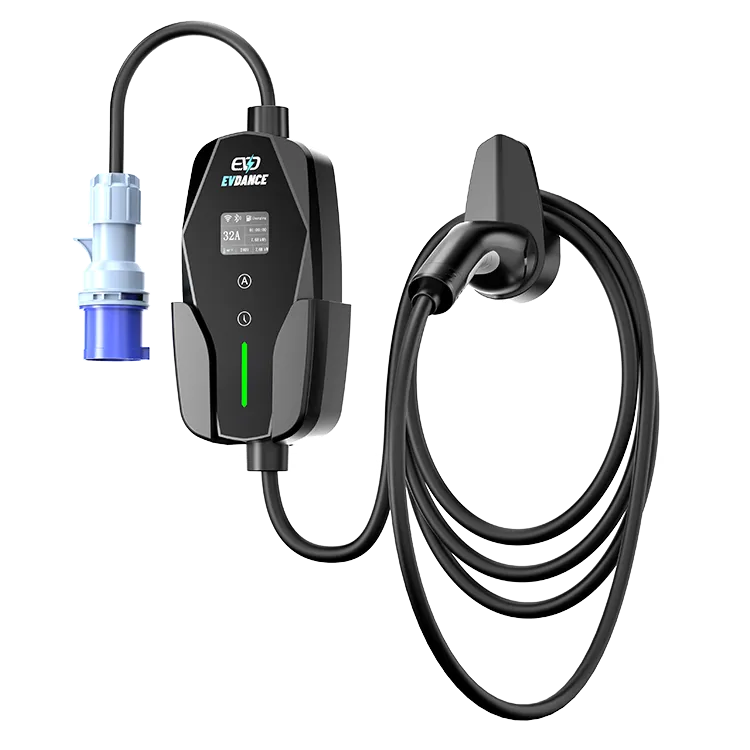
There is no honest light-by-light decode for this model in its published specification. The EV-ACS3210E‘s spec sheet lists its output, its app and its energy monitoring — but no fault-light table, and light patterns are defined model by model, by each maker. What gets your fault identified is a precise record: the pattern, the moment it appeared, the current setting in use, and what the app shows. Matched against the indicator table in the unit’s manual, or sent to EVDANCE support, that record does the decoding.
Key Takeaways
- This model’s published specification has no fault-light table — no chart can decode its lights; the manual’s indicator table is the dictionary.
- Record before you reset: pattern, moment, the setting in use, the app’s session record, model and serial.
- Heat, smell, damage or repeated trips are stop conditions that outrank any decoding.
- One reset after recording; a returning pattern plus a complete record is a support case under the 3-year warranty.
Why No Generic Chart Can Decode This Light
Indicator conventions are not standardised across chargers. Makers choose their own colours, blink counts and combinations, and the same pattern can carry different meanings on different brands — which is why a borrowed chart can point you at the wrong fault with complete confidence. For this unit, the manual’s indicator table is the only dictionary written for it. Resist two temptations: guessing from a generic chart, and clearing the signal before you record it — once the light is gone, the evidence goes with it.
The Record That Identifies a Fault
This model gives you more to record than a basic portable, because two listed features witness the same event: the app, and the session’s energy record. Capture all of it before you touch anything:
| Field | What to write down | Why it matters |
|---|---|---|
| The pattern | Colour, steady or blinking, and the blink count between pauses — a short phone video is best | The manual’s table is keyed to the pattern; memory blurs counts within the hour |
| The moment | At plug-in, mid-session, at the end of a session, or straight after a setting change | Splits supply, connection and session causes before anyone starts guessing |
| The setting in use | The current selected on this adjustable unit (10–32 A) and the socket or supply in use | A fault that follows a setting change is different evidence from one at a long-used setting |
| What the app shows | The session state and the energy recorded up to the stop | A second, timestamped witness to the same event |
| The unit and the change | Model and serial number from the rating label, plus anything that changed — a different car, weather, electrical work | Support identifies the configuration from these, and changes are the usual trigger |
Match It, Then Act in This Order
- Stop conditions outrank decoding. Heat at the plug or socket, a smell, visible damage, or a breaker that trips repeatedly ends the session — do not retry, and do not keep decoding. Those belong to a licensed electrician; our pieces on a charger flashing red and a charger that keeps tripping the breaker cover the stop-first cases.
- Look the recorded pattern up in the manual’s indicator table. That table — not this article, not a generic chart — is where this unit’s meanings live.
- One controlled reset, after recording. Unplug from the car, switch the supply off briefly, restore it and try once. If the same pattern returns, stop resetting: the record, not persistence, is what moves the case.
- Send the record. If the table points to an internal fault, or the pattern repeats, send the full record to EVDANCE support. The unit carries a 3-year standard warranty, and a complete record is what lets support identify the fault without a round of questions — reach them through the contact page.
Frequently Asked Questions
The light cleared after one reset. Do I still need the record?
Yes — keep the pattern and the date. A one-off can be a transient supply event, but if the same pattern returns next week, the two dated records together are what turn a support message into an identification.
Can the app tell me what the fault is?
The app is this model’s record and control layer, and its session view belongs in your record. Whether it names faults for this unit is a manual question — check there rather than assuming the app translates the light. The manual’s indicator table stays the authority for the light itself.
The car still charges. Can I ignore the light?
Treat any error indication as a stop sign until the manual’s table says otherwise. An indication means a check has failed or a protection has acted; charging on past it trades a recorded fault for an unrecorded risk.
Related Reading
- Why Is My EV Charger Flashing Red?
- Why Is My Electric Car Charger Not Working? A Driver’s Checklist
- Common EV Charger Faults and How Suppliers Should Handle Them
- Why Does My EV Charger Keep Tripping the Breaker?

